
ImpactHow-to guide
Log impact as a member
Record volunteering, giving or attendance from your Impact Identity, then request verification when you have evidence.
Log impact Verified Oct 6, 2026
Watch it step by step
Click the highlighted area to move through the task, or watch the video when one is available. Newer flows may use a labeled walkthrough instead of a live photo.
Any member 2 min 6 steps
Before you start: Something good you did
Step 1 of 6
1. Open Impact Identity
goodaction.com/dashboards/social/identity
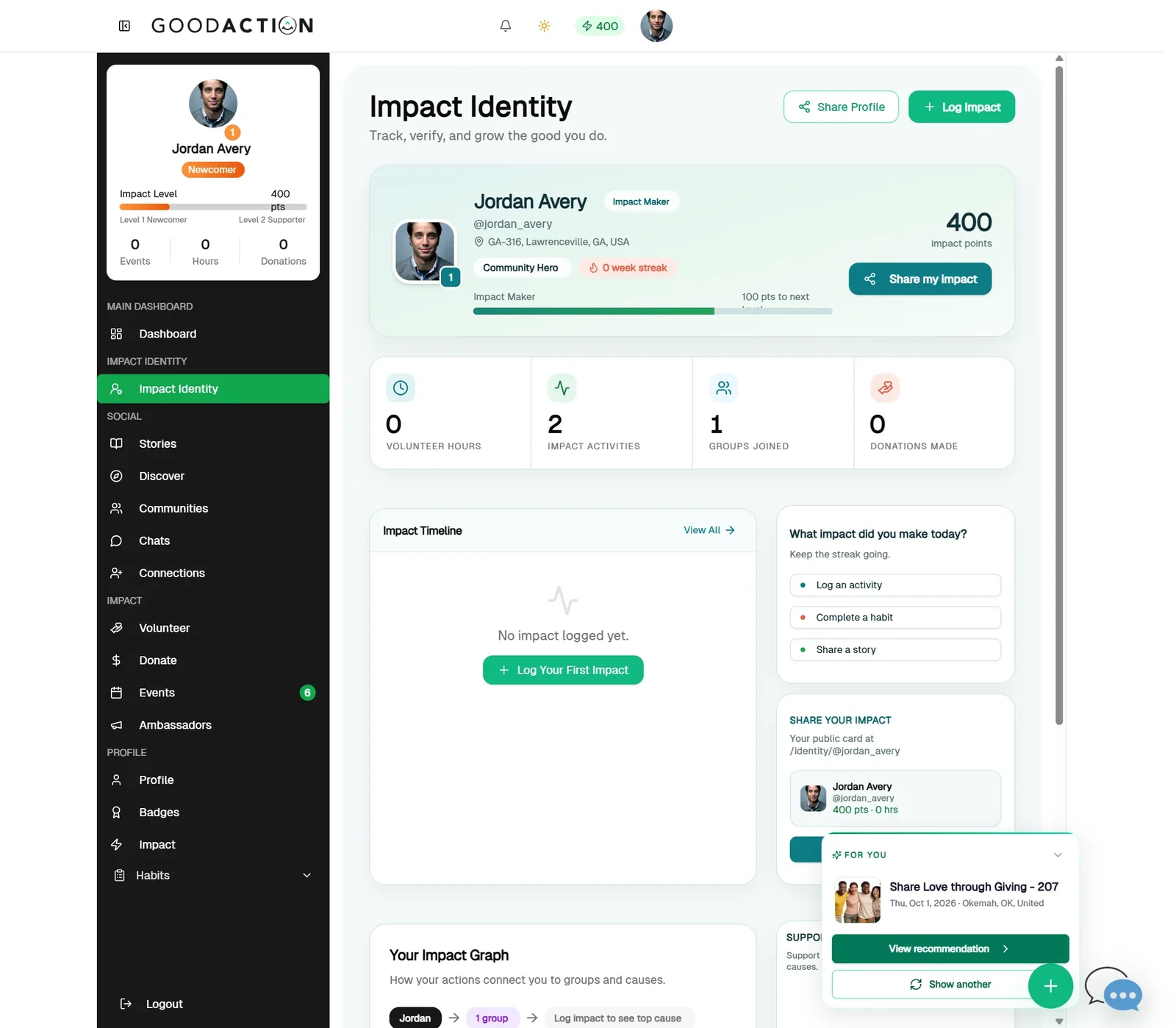
Open Impact Identity in the sidebar and click Log Impact.
Click the highlighted area, or use ← →Open this page
Done when: The activity shows in your Impact Timeline as Self Reported with its points, ready for peer or organization verification.
Log impact as a member
Overview
Record volunteering, giving or attendance from your Impact Identity, then request verification when you have evidence.
Where to find it
Open Social profile → Impact Identity.
How it works
- Open Impact Identity.
- Choose Log impact and pick the activity type.
- Add the date, hours or amount, and any evidence.
- Save, then request peer or organization verification if you need it.
If something does not look right
- Confirm the signed-in profile and current workspace.
- Capture the page address and the exact message you see.
- Ask GoodAction Support if the control is still missing.